需求:
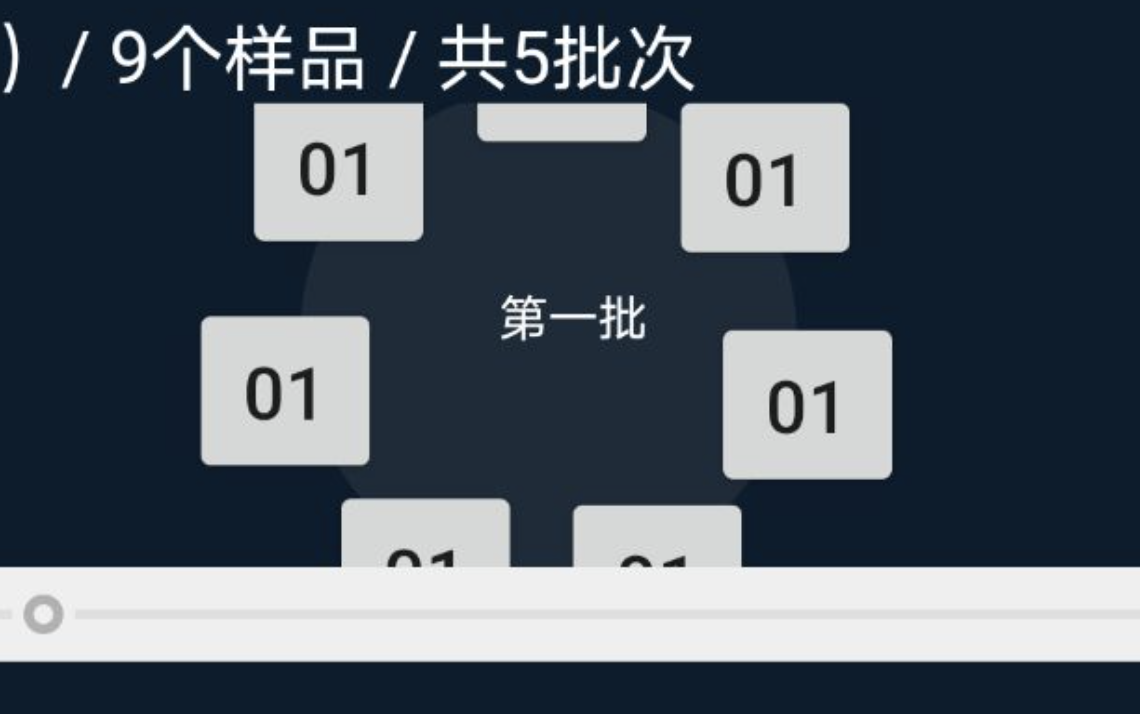
现在需要做一个圆形的布局. 每个可以在xml里面动态添加或减少子view.子view以圆形布局排列. 圆心需要有文字展示
分析:
继承一个ViewGroup,在排列的时候 通过角度计算,排列每个字view. 在圆心处利用paint 绘制所需的文字.
效果
忽略其他的布局 只看圆形的布局, 注意内部画了一个圆形,子布局中心刚好在这个圆形上.
具体代码:
package com.tongtailian.www.stir.view;

import android.content.Context;
import android.content.res.TypedArray;
import android.graphics.Canvas;
import android.graphics.Color;
import android.graphics.Paint;
import android.util.AttributeSet;
import android.util.DisplayMetrics;
import android.view.View;
import android.view.ViewGroup;
import android.view.WindowManager;

import com.tongtailian.www.stir.R;
import com.tongtailian.www.stir.utils.LogUtil;

/**
 * @author liuml
 * @explain
 * @time 2020/10/26 22:25
 */
public class CircleLayout extends ViewGroup {

    private float radius;//圆半径
    private int mDegreeDelta; //角度间距
    private int offset;//偏移角度
    private Context mContext;
    private float outWidth, outHeight;

    public CircleLayout(Context context, AttributeSet attrs, int defStyle) {
        super(context, attrs, defStyle);
        // TODO Auto-generated constructor stub
    }

    public CircleLayout(Context context, AttributeSet attrs) {
        super(context, attrs);
        setWillNotDraw(false);
        mContext = context;
        TypedArray a = context.obtainStyledAttributes(attrs,
                R.styleable.CircleLayout);
        //圆半径
        radius = a.getDimension(R.styleable.CircleLayout_radius, 20);
        //偏移角度
        offset = a.getInteger(R.styleable.CircleLayout_offset, 0);
        System.out.println("radius:" + radius);
        // TODO Auto-generated constructor stub
        a.recycle();
    }

    public CircleLayout(Context context) {
        super(context);
        mContext = context;
        // TODO Auto-generated constructor stub
    }

    private void initOutSize() {
        WindowManager manager = (WindowManager) mContext.getSystemService(Context.WINDOW_SERVICE);//获取WM对象
        DisplayMetrics dm = new DisplayMetrics();
        manager.getDefaultDisplay().getMetrics(dm);
        outHeight = (float) dm.heightPixels;//获取真实屏幕的高度以px为单位
        outWidth = (float) dm.widthPixels;
    }

    @Override
    protected void onLayout(boolean changed, int left, int top, int right, int bottom) {
        // TODO Auto-generated method stub
        //获取子view个数
        final int count = getChildCount();
        //计算各个子view之间的角度差
        mDegreeDelta = 360 / count;

        final int parentLeft = getPaddingLeft();
        final int parentRight = right - left - getPaddingRight();

        final int parentTop = getPaddingTop();
        final int parentBottom = bottom - top - getPaddingBottom();

        if (count < 1) {
            return;
        }
//        System.out.println(Math.cos(0 * Math.PI / 180));
        for (int i = 0; i < count; i++) {

            final View child = getChildAt(i);
            if (child.getVisibility() != GONE) {

                final int width = child.getMeasuredWidth();
                final int height = child.getMeasuredHeight();

                int childLeft;
                int childTop;
                if (count == 1) {
                    childLeft = parentLeft + (parentRight - parentLeft - width) / 2;
                    childTop = parentTop + (parentBottom - parentTop - height) / 2;
                    child.layout(childLeft, childTop, childLeft + width, childTop + height);

                } else {

                    childLeft = (int) (parentLeft + (parentRight - parentLeft - width) / 2 - (radius * Math.sin((i * mDegreeDelta + offset) * Math.PI / 180)));
                    childTop = (int) (parentTop + (parentBottom - parentTop - height) / 2 - (radius * Math.cos((i * mDegreeDelta + offset) * Math.PI / 180)));
                    child.layout(childLeft, childTop, childLeft + width, childTop + height);

                }

            }
        }

    }

    @Override
    protected void onMeasure(int widthMeasureSpec, int heightMeasureSpec) {
        /**
         * 获得此ViewGroup上级容器为其推荐的宽和高,以及计算模式
         */
        int sizeWidth = MeasureSpec.getSize(widthMeasureSpec);
        int sizeHeight = MeasureSpec.getSize(heightMeasureSpec);

        // 计算出所有的childView的宽和高
        measureChildren(widthMeasureSpec, heightMeasureSpec);
        setMeasuredDimension(sizeWidth, sizeHeight);
    }

    /**
     * 内圈圆
     *
     * @param canvas
     */
    private void drawCircle(Canvas canvas) {
        int width = this.getWidth();
        int height = this.getHeight();
        LogUtil.d("width = " + width + "   height = " + height);
        Paint paintOutSide = new Paint();
        paintOutSide = new Paint();
        //#1B2B39
        paintOutSide.setColor(Color.parseColor("#1B2B39"));
        paintOutSide.setAntiAlias(true);
        paintOutSide.setDither(true);
        canvas.drawCircle(width / 2.0f, height / 2.0f, 200, paintOutSide);
    }

    private void doawText(String text, Canvas canvas) {
        int width = this.getWidth();
        int height = this.getHeight();
        LogUtil.d("width = " + width + "   height = " + height);
        Paint paintText = new Paint();
        paintText.setColor(Color.WHITE);
        paintText.setAntiAlias(true);
        paintText.setDither(true);
        paintText.setTextSize(40);
        canvas.drawText(text, width / 2 - 40, height / 2, paintText);
    }

    @Override
    protected void onDraw(Canvas canvas) {
        super.onDraw(canvas);
        // 创建画笔
        Paint p = new Paint();
//        p.setColor(Color.RED);// 设置红色
        int top = getTop();
        int left = getLeft();
        LogUtil.d("top = " + top + "   left = " + left);
        p.setAntiAlias(true);// 设置画笔的锯齿效果。 true是去除,大家一看效果就明白了
//        canvas.drawCircle(500, 260, 200, p);// 大圆
        int width = this.getWidth();
        int height = this.getHeight();
        LogUtil.d("width = " + width + "   height = " + height);
        drawCircle(canvas);
        doawText("第一批", canvas);
    }
}